

 LLM
LLM VIDEO
VIDEO SPEECH & MUSIC
 Intelligence with everyone

Introducing MiniMax Code Mini App
A Mini App is a long-running application with a frontend and a backend. It installs as a plugin, calls and is called by the Agent, and keeps the Agent’s work on a page that stays live.

Today, we’re launching Mini App in the MiniMax Code desktop app. A Mini App is a long-running application with a frontend and a backend. It installs as a plugin, and it and the Agent can call each other. Our goal is to keep the Agent’s work on a page that stays live, instead of scattered across conversations.
A lot of work is already handed to Agents, from refactoring code to sorting through messages. But each task moves forward in its own conversation. Before picking one back up, you have to dig through a pile of conversations for the context and remember what that one was for. Asking the Agent for an HTML dashboard pulls the information into one place, but the page only shows the data from the moment it was generated. To keep it updated, push a task forward, or save results, you have to go back to the chat and explain everything again. Work between people and AI is never handed off just once: sometimes it needs a human’s revisions, and sometimes it needs the AI to pitch in.
Agent plugins let you change the Agent. Mini Apps let you build applications on top of it. System-level concerns like ports, the Agent, and the data directory belong to the host, MiniMax Code, which draws the boundaries between them. What the tool looks like is up to you: just tell the Agent.
Mini Apps
A Mini App is an extension compatible with the MiniMax Plugin protocol, with a miniapp.json manifest, a frontend, and a Node.js server added on top. The architecture is straightforward: the Node.js server fetches data, saves results, and exposes the app’s features to the Agent through hosted MCP. The page appears in the conversation sidebar and can pop out into its own window. Processes, ports, authentication, credentials, and rollback-capable publishing are all handled by the host.
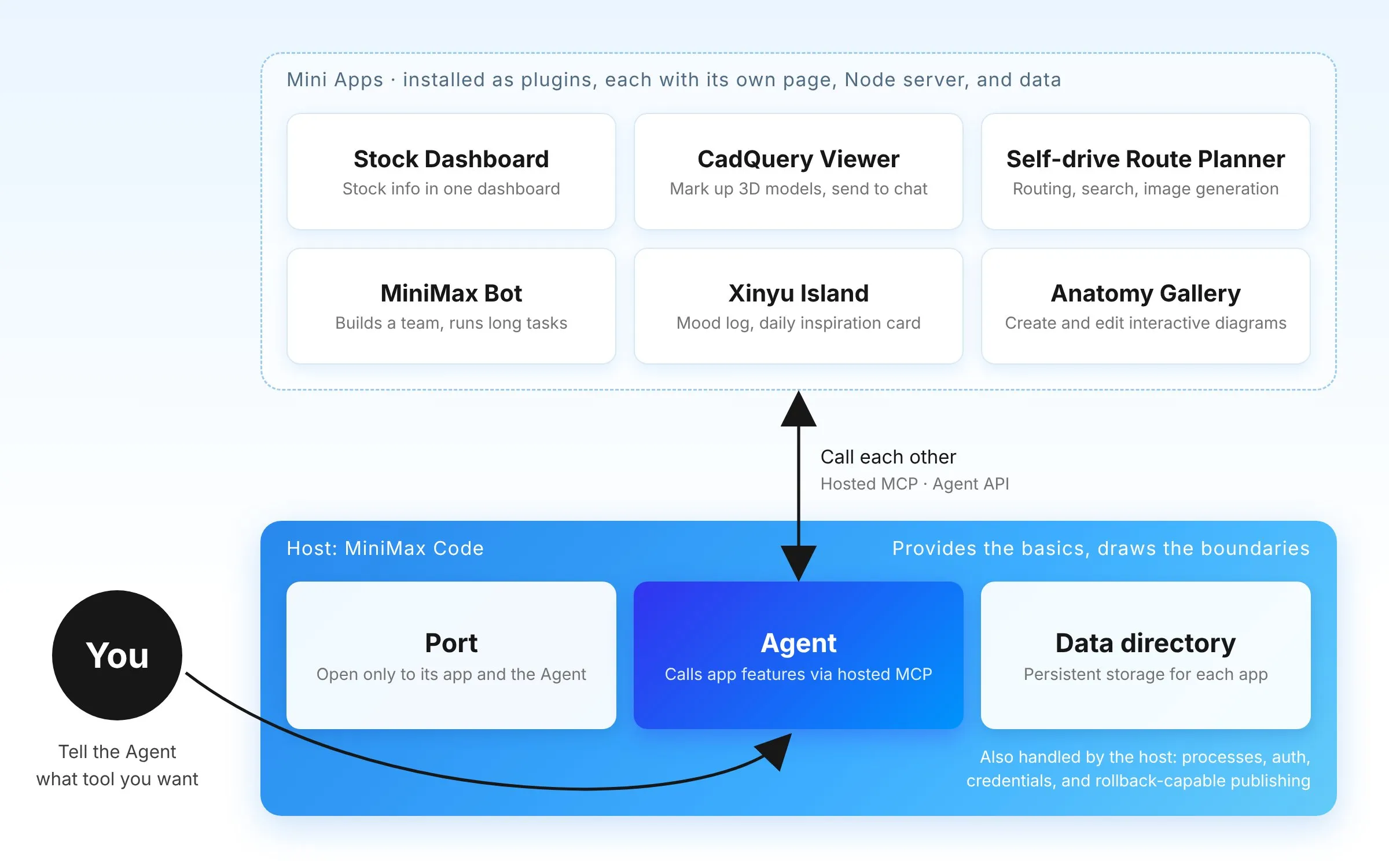
Today’s release has three parts:
- The Mini App runtime: a Node backend with a persistent data directory, hosted MCP, the Agent API, Host Connectors, and tool approvals handled right in the page
/miniapp-creator: go from a one-sentence request in chat to a working page- Official Mini Apps in the plugin marketplace, plus MiniMax-Code-MiniApps, the open-source community repository
With /miniapp-creator, the Agent first runs a read-only query against each data source to confirm it can get real data. Then it writes the page and the backend, publishes the app, opens it, and checks the result with screenshots in the built-in browser.
Several of the first official Mini Apps were built this way by colleagues outside our engineering team:
- A stock dashboard Mini App brings stock information scattered across Knowledge Planet (Zsxq), Jinmen Finance, and Tencent Docs into a single dashboard.
- CadQuery Viewer lets you mark positions on a 3D model and send them back to the conversation for the Agent to change.
- Self-drive Route Planner combines map routing, place search, and image generation into one trip-planning workspace.
- MiniMax Bot is itself a Mini App. The main bot assembles a team, hands long-running tasks to background Agent conversations, then reviews and reports on the results. Agents in those conversations can in turn call the Bot’s tools to send messages and to save and search memories. Most Bot updates only require a plugin change, with no need to wait for a MiniMax Code release. Its source code is now in the open-source community repository.
Developers in the open-source community have started building their own Mini Apps, too: a dashboard of token usage by date and model, Git Commit Tree for browsing Git history as a swimlane graph, and Session Trajectory for replaying a conversation’s model trajectory. Some lean toward everyday life and creative work, like Xinyu Island, for logging your mood and drawing a daily inspiration card, and Anatomy Gallery, where the Agent creates and edits interactive diagrams.
“From early workflows to RAG and Agentic Search, and inspired by our work at MiniMax, I’ve found that professional work needs something more than a flashy Agent: a native, tightly integrated environment where Agents and people work closely together. As a financial analyst, I used to spend most of my time pulling together scattered information. Now that Mini Apps bring it into my workspace, I can focus on thinking and judgment, and leave organizing, analyzing, and working through the information entirely to the Mini Apps.”
— Product Manager at MiniMax
On security: account credentials are held by the host, and neither plugins nor pages can access them. Connectors and Agent permissions must be declared in the manifest before they can be used. A Mini App’s server port is open only to its own pages and the Agent. When a page wants to pass something to the Agent, the content goes into your input box first, so you can review and edit it before sending. Mini App code runs on your machine as you, so only install packages from sources you trust.
Getting started
Mini Apps are available now in local sessions of the MiniMax Code desktop app (macOS / Windows).
You can install ready-made Mini Apps from the plugin marketplace, or describe what you need in chat and have the Agent build one on the spot. After using it for a while, ask the Agent to adjust it to the way you work.
To start building:
- Download MiniMax Code: https://agent.minimax.io/download (mainland China: https://agent.minimax.cn/download)
- Follow the quickstart to build your first Mini App with
/miniapp-creator: https://agent.minimax.io/docs/miniapp/authors/quickstart
An open community
The source code for MiniMax Bot and the community’s Mini Apps all live in the open-source repository MiniMax-Code-MiniApps. If you’ve built a Mini App you find useful, we’d love for you to share it with a pull request.
If you need a runtime capability Mini Apps don’t have yet, leave a comment on the pinned capability wishlist in the community repository.